


Current Regular Subscription Rates
Monthly Subscription: $29, Yearly Subscription: $145
Upcoming Live 3-Hour Workshop Dates
December 10th 2025, 1:00-4:00 PM ESTJanuary 14th 2026, 1:00 PM ESTFebruary 11th 2026, 1:00 PM EST
March 12th 2026, 1:00 PM EST
Check out the Workshop Schedule for links and access codes.
Quick Links
The Curious Zombie started out as an education project to introduce concepts in science and technology to audiences who were new to them - and in that spirit, this course is designed to be a complete introduction to Python, suitable even for absolute beginners. This workshop-based course takes you from the basics of the core language, to data visualization, GUI building, and Object-Oriented Programming.
Test drive a free lesson
Want to test drive one of our lessons for yourself? Check out Lesson 3: Math and Python Types for free.
Please introduce yourself
If you’re a paid subscriber, and you haven’t already done so, we would encourage you to go the chat forum and introduce yourself to the community. We aim to make the chat forum a resource for help and support on your Python journey - a place where you can ask questions and get answers from the course instructors and the community.
A culture of consideration and respect
We strive to create a culture of consideration and respect for all participants, regardless of gender, age, race, religion, nationality, ethnicity, or sexual orientation. Amber Research reserves the right to expel any student from this community who in our view, fails to maintain this standard of respect and consideration for the other participants. We will also expel anyone from this community, who attempts to use any part of this site for advertising or promotional purposes.
Navigating the course site
All of the lessons and workshops are grouped under their own tags, and can be readily accessed from the site’s navigation bar. You will also find a link to the community chat forum, and we encourage you to join our chat forum so that you can get help and support with your Python studies, both from us, and from our student community. This is also a great place to share your solutions to the exercises and workshops, whether successful or not, and get feedback on them.
How To Prepare
All you will need for this course is your computer and a good internet connection.
If you are taking the course remotely, please make sure you have a comfortable working setup for this course, with good ergonomics. You should be able to sit with good posture, not too close to your computer screen. Wear your prescription eyeglasses if you need them for computer work, so that you don’t get eyestrain. Here’s a link to the Mayo Clinic’s recommendations for good workplace ergonomics, in case you need some guidance for setting up your own workplace.
Take regular breaks! Get up periodically and stretch your legs, step away from your computer, get a drink or a snack - relax!
The Video Lessons
We have broken this course down into a series of fairly short, easily digestible sections, each with its own video lessons and workshops. The lessons will appear on each of the course pages as embedded videos. If you are taking this course live, either online or in a classroom setting, the instructors will play each video for the entire class, before moving to the Question & Answer or Workshop sessions. If at any time, you would like to review the teaching material, you can play any of the videos again, pausing or replaying any sections of the lesson that you did not understand the first time around. If you are taking the course remotely on your own, you are of course, free to go through the lessons at your own pace.
BEFORE MOVING ON TO THE COURSE ITSELF, BE SURE TO ALSO WATCH THIS “Video lessons and workshops” VIDEO.
The workshops
Check out the Workshop Schedule for details of the upcoming live workshops!
The live workshops are a vital part of this course, and offer an accelerated learning trajectory compared to studying with the videos and exercises entirely by yourself. The workshops are the place where you get answers to the questions you have - explained and worked through in detail. They are the place where you can get clarity on those aspects of Python that you might still be struggling with, and this can make all the difference going forward. In our years of teaching this course, we’ve already encountered students who had struggled for some time to use a particular feature of Python effectively in their code, only to discover in one of our workshops, that they had been misunderstanding all along, how it actually works.
Our workshops are held on a regular basis, sometimes even after working hours, to give everybody who signs up for them, a regular opportunity to review the course material or any of the exercises - live with our instructors. Depending on the type of course you are enrolled in, this will either be in-person (probably at your employer’s facility), or online.
We strongly recommend that you avail yourself of this opportunity to attend the workshops, since in our experience, it is the students who participate most in the class, and who use the instructors as a resource, that get the most out of the course.
Coding in your web browser
In order to be able to jump right into the course and avoid having to go through a Python installation on the laptop of every student, and also to ensure that every student is working in the same Python environment, we are going to be using a web-based Python platform called Trinket that allows you to write and run Python code directly in your web browser. In order to make sure that Trinket works in your browser, take a look at the little code window below. It shows the archetypal “Hello World” script that is often the very first piece of code that any programmer learns in a new programming language. All this code does is outputs “Hello World!” to the console, and if the web-based Python platform is working in your browser, you should see “Hello World!” printed in the output panel on the right hand side of the code window.
If you are unable to see the code window or to make it run, please get in touch with one of the course instructors immediately so that they can fix it (or help you find somebody else to blame for it).
Oops!
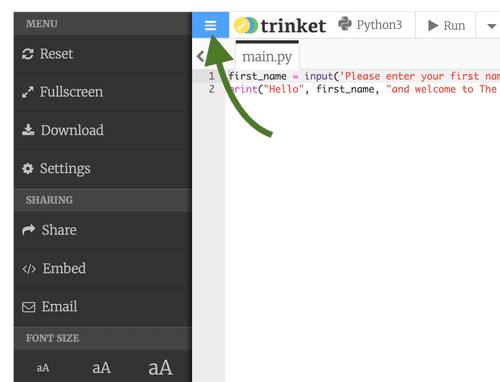
As a student of this course, we want you to experiment and play around with the code that you encounter during the lessons and workshops. It’s important to realize that anything you do in the Trinket code on your screen, does not affect the code of any other students, if you are taking the course live. Each Trinket is essentially your own, personal copy, to play with as you wish. Furthermore, if you start out with a Trinket that already has some code in it and break the code by making some edits, you can always recover the initial state of the Trinket by clicking on the little menu button (with the 3 stacked horizontal bars) located at the upper left of the Trinket, and using the Reset option, as shown below.
Your Python workspace
Underneath all of the code for each lesson as well as in each of the workshops, you will find a Python code window with no code in it. This is a space for you to play around with your own code, or to cut and paste pieces of the lesson code to remix and experiment with. You can try out any Python code here, and even use it as an area to think out loud when working on the exercises for that lesson.
The Python Code Scratchpad
Sometime we want to share some Python code with the wider community of students. You can scan these code snippets here in this document at your leisure, or you can find them in the chat, with links back to this document if you want to cut and paste the code to use it yourself.
The lessons and workshops
Section 1
Section 2
Section 3
Section 4
Section 5
Section 6
Section 7
Section 8
Lesson 15: The Python Standard Library, modules and packages
Lesson 17: Python generators, the with keyword, and the random module
Section 9
Section 10
Section 11
Section 12
Please note that this course material, in all formats is © Amber Research. All rights are reserved, and this material should not be reproduced or distributed.